Print sheets
Print one or more sheets with a printer.
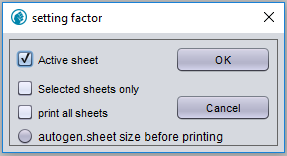
Figure 1. Popup when printing sheets
- Active sheet
-
Prints the current sheet.
- Selected sheets only
-
Prints only selected sheets.
- Print all sheets
-
Prints all sheets of the project. Either screens or logic pages are printed, dependent on the drawing mode. This option skips all excluded sheets.
- Autogen sheet size before printing
-
Determine the size of the drawing before printing using the contents of the sheet. The size is used to scale the print of the drawing.
- OK
-
Print the sheets. A popup will appear to select the printer.
| To print to pdf, select a pdf printer. |
- Cancel
-
Cancels the current action.