Synchronization
Synchronize
In the menu bar under there are six available functions for synchronization. These are explained in detail in the following paragraphs.
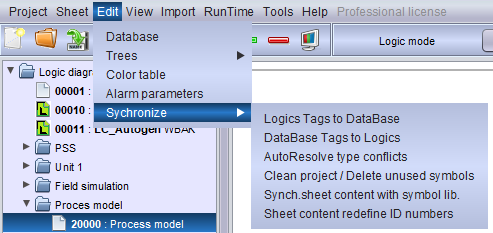
Logics Tags to Database
This function will be automatically executed when PsxCad prepares for runtime mode. All the tags used on logic pages will be scanned and compared to the database, that PsxCad uses as his memorybank while running simulations. Changes in the logic tags will be adjusted within the database to make them synchronized. The logic tags are leading in this synchronization.
Database Tags to Logics
This is the opposite of "Logics Tags to Database" function. This function will not be executed while entering runtime mode. Here the logic tags will be compared and adjusted to the database to make them synchronized. The database is leading in this synchronization.
AutoResolve type conflicts
Scans the project for conflicts in datatypes and resolves them by changing the datatypes of the outputs.
Clean project / Delete unused symbols
Scans the project for unused symbols and deletes them from the symbol library. Be careful with this functionality because it can not be undone. Using this function will make the project smaller in size and thereby faster to open.
Synchronize sheet content with symbol library
Reverts all symbol properties in the project to the default one in the library For example, if by mistake a symbol is different from the library, this function will adjust the symbol so that it is the same as in the library. This function is rarely used, but when, for example, imports have been made in the wrong way, this function might be useful.