Save to image
Saves a sheet as an image. This can be useful to save a control screen as an image. The sheet can be saved as a .png, .gif or a .jpg.
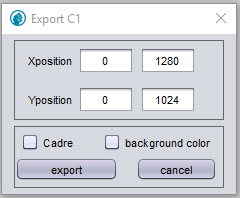
Figure 1. Popup when saving sheet as image
- Xposition
-
The X-position of the to-be-saved sheet, measured in pixels.
- YPosition
-
The Y-position of the to-be-saved sheet, measured in pixels.
| When saving the entire sheet, input the measurements of the sheet when prompted for Size. |
- Cadre
-
Also saves the cadre of the page.
- Background color
-
Saves the background color. Otherwise it will be saved as white.
- Export
-
Saves the drawing. The drawing can be saved as different extensions. Input the desired extension when inputting the file-name.
| The default directory is the install directory of PsxCad. Navigate to the directory where you wish to save the image to ensure an organized install directory. |
- Cancel
-
Cancels the current action.